Quickstart
Installation
pydiverse.pipedag is distributed on PyPi and Conda-Forge. To use it, just install it with pip, conda, or pixi. We recommend also installing pydot since it helps visualizing flow execution:
pip install pydiverse-pipedag pydot
conda install -c conda-forge pydiverse-pipedag pydot
or much faster than conda after installing pixi:
mkdir my_data_proj
cd my_data_proj
pixi init
pixi add pydiverse-pipedag pydot
With pixi, you need to run python with pixi run python or pixi run python quickstart.py. This looks cumbersome,
but it actually fits much better with posix shell principles of not modifying the parent process environment
than environment activation scripts. There is still pixi shell which opens a new shell ready to run pip, pixi, and
python commands. The first run of a flow with a newly built environment might be slow.
What is a Flow, a Task, and a Stage?
A flow is a collection of tasks. In the majority of cases, a task is a piece of code that receives some tables from the database as input and produces one or more tables as output. Pipedag takes care of the reading and writing of tables and thus the task can focus on the actual data transformation logic. Pipedag also allows that different tasks are written with different styles of data transformation code. Examples are:
RAW SQL: “CREATE TABLE AS SELECT 1 as a”
Handwritten SQL: query = “SELECT 1 as a”
SQLAlchemy: query = sa.select(sa.literal(1).label(“a”))
Ibis: query = ibis.literal(1).name(“a”)
Pandas: df = pd.DataFrame({“a”: [1]})
Polars: df = pl.DataFrame({“a”: [1]})
Tasks of different styles can be combined in the same flow because pipedag provides the input tables in the format that
the task expects. Tasks get defined using the @materialize decorator.
Within a flow, tasks are grouped into stages. Stages are used to group tasks that are logically related to each other. Stages are typically represented by a schema in a database. New tables in such a schema will only be available in case all tasks of a stage completed successfully. But don’t worry, in case of an error, you will be able to look at the partially written new schema, just under a different name.
Running your first Flow
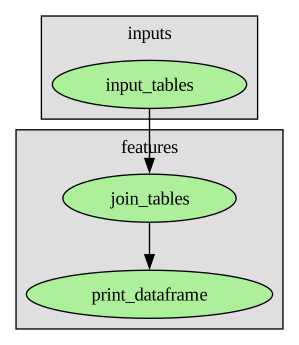
In the following example, we will create a very simple flow that loads two data frames into the database, then uses SQL to join them, and finally retrieves the joined table from the database as a data frame and prints it.
We’ll start with defining the flow.
To do this, create a new python file (let’s call it quickstart.py) inside an empty folder with the following content:
import pandas as pd
import sqlalchemy as sa

from pydiverse.pipedag import Flow, Stage, materialize


# Define the different tasks our flow consists of
@materialize(version="1.0", nout=2)
def input_tables():
    names = pd.DataFrame({
        "id": [1, 2, 3],
        "name": ["Alice", "Bob", "Charlie"],
    })

    ages = pd.DataFrame({
        "id": [1, 2, 3],
        "age": [20, 40, 60],
    })

    return names, ages


@materialize(lazy=True, input_type=sa.Table)
def join_tables(names, ages):
    return (
        sa.select(names.c.id, names.c.name, ages.c.age)
        .join_from(names, ages, names.c.id == ages.c.id)
    )


@materialize(input_type=pd.DataFrame)
def print_dataframe(df):
    print(df)


def main():
    # Define how the different tasks should be wired
    with Flow("flow") as flow:
        with Stage("inputs"):
            names, ages = input_tables()

        with Stage("features"):
            joined_table = join_tables(names, ages)
            print_dataframe(joined_table)

    # # In case you provide a pipedag.yaml, you can run the flow as simple as:
    # flow.run()

    # run flow with a duckdb configuration in a random temporary directory (this is easier to get started)
    import tempfile
    from pydiverse.pipedag.core.config import create_basic_pipedag_config
    with tempfile.TemporaryDirectory() as temp_dir:
        cfg = create_basic_pipedag_config(
            f"duckdb:///{temp_dir}/db.duckdb",
            disable_stage_locking=True,  # This is special for duckdb
        ).get("default")
        # Execute the flow
        flow.run(config=cfg)


if __name__ == "__main__":
    from pydiverse.common.util.structlog import setup_logging

    setup_logging()  # you can setup the logging and/or structlog libraries as you wish
    main()
If you now run the flow by running python quickstart.py, you should see a bunch of logging output.
This is completely normal.
Somewhere within all the log lines you should see the following lines getting printed:
   id     name  age
0   1    Alice   20
1   2      Bob   40
2   3  Charlie   60
This means that everything went as expected.
If you like to connect to a running database, you can find another way of configuring pipedag here. There are example directories prepared which make it easy to launch various databases as docker containers: table_backends
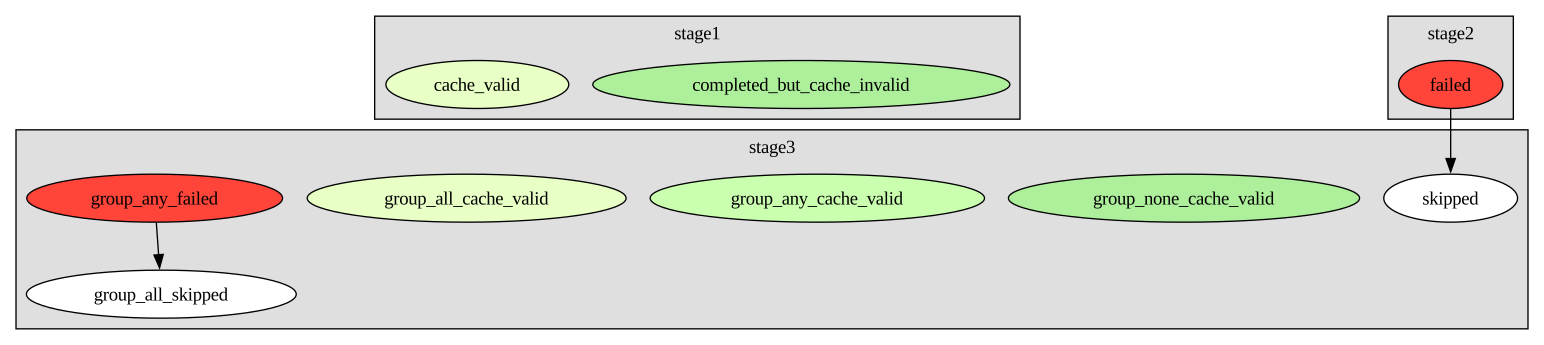
There are various ways to visualize your flow which will color encode which tasks ran, which ones failed, which ones were cache, valid, etc.:
Here is a legend of default colors:
Here, you can find more examples.
What is going on here?
Declaration time vs. run time
It is important to understand that there is a difference between flow declaration time and flow run time.
We really like that the code that wires the tasks looks like it could be actual code that produces tables and passes
them on to other tasks. However, whenever a task function with @materialize
decorator is called within a with Flow() as flow: statement, it does not actually run, and it does not actually
produce any tables. Just the wiring of tasks is recoded, so that flow.run() actually executes all tasks. Please note
that the tuple decomposition in names, ages = input_tables() already needs to happen at declaration time before the
return statement of def input_tables() is executed. Thus, the @materialize
decorator has a parameter called nout, which must match the number of elements in which the task output should be
decomposable. Tasks can also return lists and dictionaries. get-item access executed on them on declaration time will
also just be recorded and lazily evaluated with consuming tasks.
Materialization, dematerialization, and input_type parameter
Please note the input_type parameter of the @materialize decorator. It is
used to specify the type in which the task likes to process tabular inputs. Pipedag takes care of reading the table from
the configured table store and to present it to the task in the requested form. The typical table store is a SQL
database. All tabular outputs of the task are written to the table store independent of its form. You can find a list
of supported input_type choices here.
Automatic cache invalidation with lazy=True
For SQL tasks, a common input_type is sqlalchemy.Table. This would provide SQLAlchemy table references to input tables
which are already auto-loaded, so they would know about columns and column types of the respective table in the
database. Ideally, this is combined with the parameter lazy=True in @materialize.
In this case, the task must produce a SQLAlchemy expression for
all tabular outputs without executing them. Pipedag can render the query and will only produce a table based on this
query expression if the query changed or one of the inputs to the task changed.
For tasks returning a Polars or Pandas DataFrame, the hash of the resulting DataFrame is used to determine whether to cache-invalidate downstream tasks.
Manual cache invalidation with version parameter
For non-lazy tasks, the version parameter of the @materialize decorator must
be used for manual cache invalidation. As long as the version stays the same, it is assumed that the code of the task
did not materially change and will produce the same outputs given the same inputs. We refrained from automatically
inspecting any python code changes since this would break at shared code changes where it is very hard to distinguish
material changes. Not setting the version parameter for non-lazy tasks, will result in the task always being called
without any cache validity checks.
Automatic cache invalidation with version=AUTO_VERSION
There is a special case for example when using input_type=polars.LazyFrame, where we can’t use lazy=True because
the data would always be loaded from the table store to polars, but we still can do automatic cache invalidation.
version=AUTO_VERSION loads empty input lazyframes with the correct column types, then executes the task to determine
any lazyframe expressions in the output of the task. The version is then automatically computed from a hash of the
computation graph. In case the cache for the task is invalid, the full data is loaded and the task is executed a
second time.