DAG Visualization and Grouping Tasks/Stages
This example how to group tasks and stages within the visualization of the pipeline. Grouping may also be used as a way to ensure some tasks to be executed before/after others even if they don’t have an explicit dependency.
This is a simple flow visualization example with a group:
        with Flow() as flow:
            with Stage("stage1"):
                _ = any_task()
                with GroupNode("group1"):
                    task1 = task_within_group()
                    _ = task_within_group2(task1)
                _ = any_task()
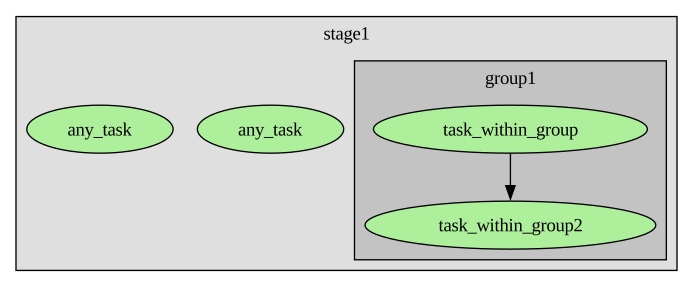
You can also use the group to order tasks within a stage with ordering_barrier=True parameter:
        with Flow() as flow:
            with Stage("stage1"):
                _ = any_task()
                with GroupNode("group1", ordering_barrier=True):
                    task1 = task_within_group()
                    _ = task_within_group2(task1)
                _ = any_task()
In this visualization case, the tasks outside the group are linked with the group:
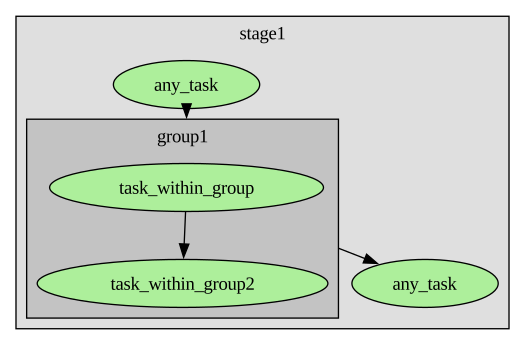
The group style can be configured quite flexibly with passing a VisualizationStyle parameter:
        with Flow() as flow:
            with Stage("stage1"):
                _ = any_task()
                with GroupNode(
                        "group1", ordering_barrier=True,
                        style=VisualizationStyle(hide_content=True, box_always_color="#ccccff")
                ):
                    task1 = task_within_group()
                    _ = task_within_group2(task1)
                _ = any_task()
In this visualization case, the content of the group is hidden and the color of the box is chosen explicitly:
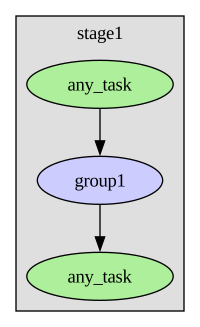
The box of groups can be hidden. In case of ordering_barrier=True, barrier tasks are added in visualization instead:
        with Flow() as flow:
            with Stage("stage1"):
                _ = any_task()
                with GroupNode("group1", ordering_barrier=True, style=VisualizationStyle(hide_box=True)):
                    task1 = task_within_group()
                    _ = task_within_group2(task1)
                _ = any_task()
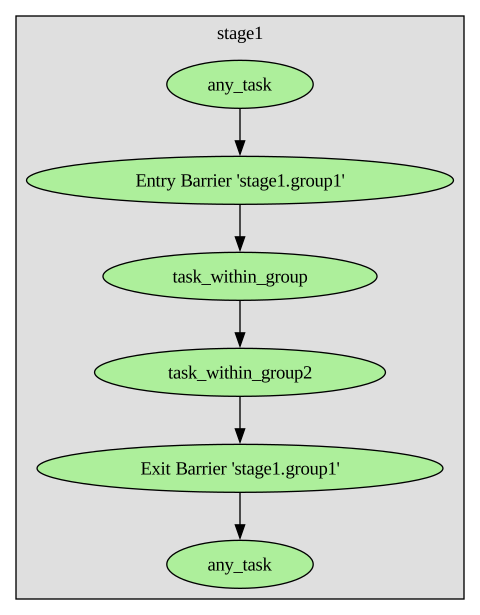
Groups can also span stages like this:
        with Flow() as flow:
            with GroupNode("group1"):
                with Stage("stage1"):
                    task1 = task_within_group()
                    _ = task_within_group2(task1)
            with Stage("stage2"):
                _ = any_task()
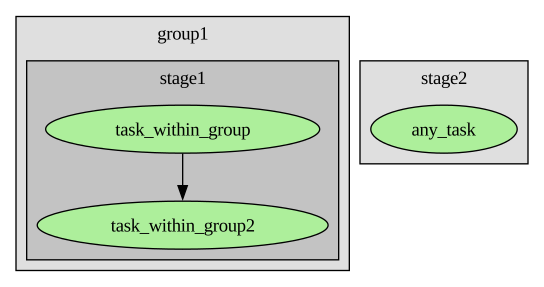
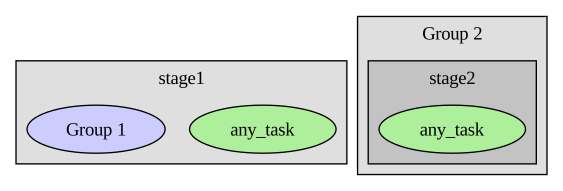
And it is possible to setup visualization groups within configuration:
        with Flow() as flow:
            with Stage("stage1"):
                _ = any_task()
                task1 = task_within_group()
                _ = task_within_group2(task1)
            with Stage("stage2"):
                _ = any_task()
instances:
    __any__:
        visualization:
            default:
                styles:
                    my_group_style:
                        hide_content: true
                        box_color_always: "#ccccff"
                group_nodes:
                    my_group1:
                        label: "Group 1"
                        tasks:
                          - task_within_group
                          - task_within_group2
                        style_tag: my_group_style
                    my_group2:
                        label: "Group 2"
                        stages:
                            - stage2
For testing, it might be easier to assemble the configuration in code:
        from pydiverse.pipedag.core.config import create_basic_pipedag_config, PipedagConfig
        base_cfg = create_basic_pipedag_config(
            f"duckdb:///{temp_dir}/db.duckdb",
            disable_stage_locking=True,  # This is special for duckdb
            # Attention: If uncommented, stage and task names might be sent to the
            #   following URL. You can self-host kroki if you like:
            #   https://docs.kroki.io/kroki/setup/install/
            #   You need to install optional dependency 'pydot' for any visualization
            #   URL to appear.
            kroki_url="https://kroki.io",
        )
        group_nodes = dict(
            my_group1=dict(tasks=["task_within_group", "task_within_group2"], label="Group 1", style_tag="my_group_style"),
            my_group2=dict(stages=["stage2"], label="Group 2"),
        )
        styles = dict(
            my_group_style=dict(hide_content=True, box_color_always="#ccccff"),
        )
        visualization = dict(default=dict(group_nodes=group_nodes, styles=styles), alternative={})
        raw_cfg = base_cfg.raw_config.copy()
        raw_cfg["instances"]["__any__"]["visualization"] = visualization
        cfg = PipedagConfig(raw_cfg).get()
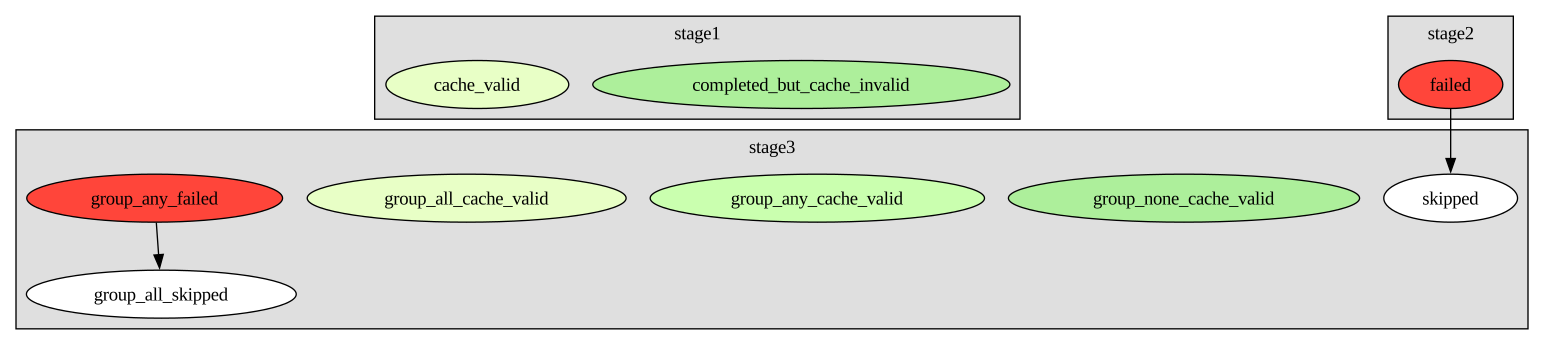
Here is a legend of default colors used for tasks and group nodes:
The following code (see also example.zip) is a basis
for testing the code snippets from above.
It can also be executed as jupyter notebook
when using an ipython kernel similar to running conda env create
with this environment.yml.
import tempfile

from pydiverse.pipedag import Flow, Stage, materialize, GroupNode, VisualizationStyle
from pydiverse.pipedag.core.config import create_basic_pipedag_config
from pydiverse.common.util.structlog import setup_logging


@materialize
def any_task():
    return 1

@materialize
def task_within_group():
    return 2

@materialize
def task_within_group2(input1: int):
    return input1 + 1


def main():
    with tempfile.TemporaryDirectory() as temp_dir:
        cfg = create_basic_pipedag_config(
            f"duckdb:///{temp_dir}/db.duckdb",
            disable_stage_locking=True,  # This is special for duckdb
            # Attention: stage and task names might be sent to the
            #   following URL. You can self-host kroki if you like:
            #   https://docs.kroki.io/kroki/setup/install/
            #   You need to install optional dependency 'pydot' for any visualization
            #   URL to appear.
            kroki_url="https://kroki.io",
        ).get("default")
        with cfg:
            with Flow() as flow:
                with Stage("stage1"):
                    _ = any_task()
                    with GroupNode(
                            "group1", ordering_barrier=True,
                            style=VisualizationStyle(hide_content=True, box_color_always="#ccccff")
                    ):
                        task1 = task_within_group()
                        _ = task_within_group2(task1)
                    _ = any_task()

            # Run flow
            result = flow.run()
            assert result.successful

            # you can also visualize the flow explicitly:
            # kroki_url = result.visualize_url()
            # result.visualize()


if __name__ == "__main__":
    setup_logging()  # you can setup the logging and/or structlog libraries as you wish
    main()
This code was used for creating the legend of colors:
import tempfile

from pydiverse.pipedag import Flow, GroupNode, Stage, VisualizationStyle, materialize
from pydiverse.pipedag.core.config import create_basic_pipedag_config
from pydiverse.common.util.structlog import setup_logging


@materialize
def failed():
    assert False, "This task is supposed to fail"


@materialize(version=None)
def completed_but_cache_invalid():
    return 1


@materialize(version="1.0")
def cache_valid():
    return 2


@materialize(version="1.0")
def cache_valid2():
    return 3


@materialize
def skipped(out):
    return out + 1


def main():
    with tempfile.TemporaryDirectory() as temp_dir:
        cfg = create_basic_pipedag_config(
            f"duckdb:///{temp_dir}/db.duckdb",
            disable_stage_locking=True,  # This is special for duckdb
            # Attention: stage and task names might be sent to the
            #   following URL. You can self-host kroki if you like:
            #   https://docs.kroki.io/kroki/setup/install/
            #   You need to install optional dependency 'pydot' for any visualization
            #   URL to appear.
            kroki_url="https://kroki.io",
            fail_fast=False,
        ).get("default").evolve(swallow_exceptions=True)
        with cfg:
            with Flow() as flow:
                with Stage("stage1"):
                    _ = completed_but_cache_invalid()
                    _ = cache_valid()
                with Stage("stage2"):
                    out = failed()
                with Stage("stage3"):
                    _ = skipped(out)
                    with GroupNode("group_none_cache_valid", style=VisualizationStyle(hide_content=True)):
                        _ = completed_but_cache_invalid()
                    with GroupNode("group_any_cache_valid", style=VisualizationStyle(hide_content=True)):
                        _ = completed_but_cache_invalid()
                        _ = cache_valid()
                    with GroupNode("group_all_cache_valid", style=VisualizationStyle(hide_content=True)):
                        # avoid memoization (not counted as cache valid)
                        _ = cache_valid2()
                    with GroupNode("group_any_failed", style=VisualizationStyle(hide_content=True)):
                        _ = completed_but_cache_invalid()
                        out = failed()
                        _ = skipped(out)

            # Run flow
            result = flow.run()
            assert not result.successful

            # Run flow again for cache validity
            result = flow.run()
            assert not result.successful

            # you can also visualize the flow explicitly:
            # kroki_url = result.visualize_url()
            # result.visualize()

if __name__ == "__main__":
    setup_logging()  # you can setup the logging and/or structlog libraries as you wish
    main()